Working with the Reactor
Document models are the common design pattern that is used for all documents and files.
DocSync is a decentralized synchronization protocol that is storage agnostic.
Document Models are what is synced and DocSync is how document models are synced.
But who is doing the syncing?
We call these participants Reactors.
Powerhouse Reactors
What is a Reactor? Powerhouse Reactors are the nodes in the network that store documents, resolve conflicts and rerun operations to verify document event histories. Reactors can be configured for local storage, centralized cloud storage or on a decentralized storage network. A Reactor is essentially a storage node used in Powerhouse's framework to handle documents and traditional files. It supports multiple storage solutions, including:
- Local Storage: For offline or on-device access.
- Cloud Storage: For centralized, scalable data management.
- Decentralized Storage: Such as Ceramic or IPFS, enabling distributed and blockchain-based storage options.
Core Functions of Reactors
- Data Synchronization: Reactors ensure that all data, whether local or distributed, remains up-to-date and consistent across the system.
- Modular Storage Adapters: They support integration with different storage backends depending on organizational needs.
- Collaboration Support: Reactors facilitate document sharing and peer-to-peer collaboration across contributors within the network.
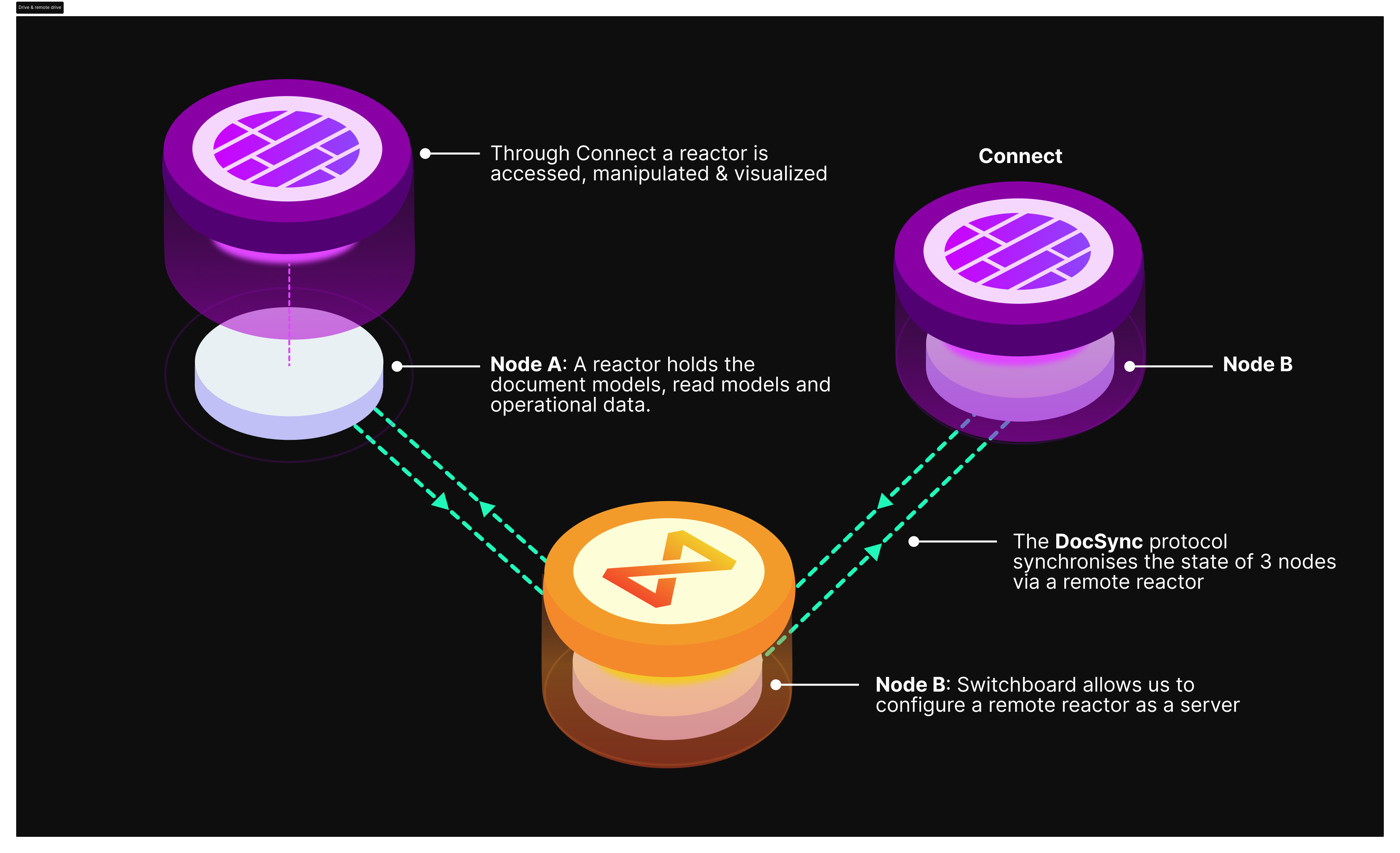
The DocSync protocol sends updates from one reactor to another - smashing document operations into one another - to ensure all data is synced.
A reactor is responsible for storing data and resolving merge conflicts.
Editing data and submitting new operations must be done through Powerhouse's native applications (Connect, Switchboard, Fusion). Each instance of these applications contains a Reactor that is responsible for storing data and syncing data through DocSync. In other words, Powerhouse applications are how Reactors can be accessed, manipulated, steered, visualized and modified. A local Connect desktop application's reactor can therefore sync with the Reactor of a remote drive (e.g. Switchboard instance).
Why Are Reactors Important?
They are key to ensuring the scalability and resilience of decentralized operations. By acting as the backbone for document models in the Powerhouse framework, they enable seamless version control and event-driven updates. Reactors provide the foundation for advanced features like real-time collaboration, history tracking, and decentralized audits. This modular, flexible infrastructure enables organizations to build efficient and robust decentralized systems, tailored for modern network organizations
Getting an IReactorClient
There are a few ways to obtain an IReactorClient, depending on where your code runs.
In an app (React). Call the useReactorClient() hook from @powerhousedao/reactor-browser. It returns the IReactorClient for the running reactor.
import { useReactorClient } from "@powerhousedao/reactor-browser";

const client = useReactorClient();
The same module exposes sibling hooks: useSync (the ISyncManager), useSyncList (its remotes), useModelRegistry (the document-model registry), useDatabase (the Kysely database), and usePGlite (the PGlite instance).
Standalone (scripts, tests, servers). Build a client with ReactorClientBuilder. Wire a reactor with either .withReactorBuilder(builder) or .withReactor(reactor, eventBus, documentIndexer, documentView), add .withSigner(...) and .withDocumentModelLoader(...) as needed, then call .build() (returns the client) or .buildModule() (returns the client plus the wired module).
import { ReactorClientBuilder } from "@powerhousedao/reactor";

const client = await new ReactorClientBuilder()
  .withReactorBuilder(reactorBuilder)
  .withSigner(signer)
  .build();
buildModule() throws if neither withReactorBuilder nor withReactor was set. For the low-level builder detail, see Advanced Reactor Usage.
In a generated subgraph (server-side). A generated subgraph extends BaseSubgraph, which holds the client as the reactorClient property. The generated getResolvers(subgraph) reads it off the instance; inside a method on the subgraph class, use this.reactorClient. The GraphQL resolver context does not carry the reactor.
import { type BaseSubgraph } from "@powerhousedao/reactor-api";

// resolvers.ts (generated scaffold)
export const getResolvers = (subgraph: BaseSubgraph) => {
  const reactor = subgraph.reactorClient; // IReactorClient

  return {
    Query: {
      todoList: (_parent: unknown, args: { id: string }) => reactor.get(args.id),
    },
  };
};
In a generated processor (server-side). The processor factory builder receives the host module; the client is module.client. The parameter is typed as the base IProcessorHostModule, which exposes relationalDb, analyticsStore, dispatch, and getReadModel but not client. Widen it to IReactorProcessorHostModule to reach client (and attachments). See Processors for the full registration flow.
import type {
  IReactorProcessorHostModule,
  ProcessorFactoryBuilder,
} from "@powerhousedao/reactor-browser";

// factory.ts (generated scaffold)
export const factoryBuilder: ProcessorFactoryBuilder = (module) => {
  // `module` is typed as the base IProcessorHostModule; widen it to reach `client`.
  const { client } = module as IReactorProcessorHostModule; // client: IReactorClient
  return async () => {
    // use client.get(...), client.drives, client.execute(...)
    return [];
  };
};
The ReactorClient API
The IReactorClient is the primary interface for interacting with a reactor programmatically. It wraps lower-level APIs to provide a simpler, Promise-based interface for document operations.
import type { IReactorClient } from "@powerhousedao/reactor-browser";
@powerhousedao/reactor-browser re-exports a curated subset of reactor types for browser environments (editors, drive-apps, subgraphs) — including IReactorClient, DocumentChangeType, ReactorBuilder, and ReactorClientBuilder. Other types used on these pages (ViewFilter, SearchFilter, PagingOptions, PagedResults, PropagationMode, JobInfo, JobStatus, DocumentChangeEvent, OperationFilter, IReactor, ReactorEventTypes, SyncEventTypes, QueueEventTypes) are not re-exported; import them from @powerhousedao/reactor. Outside the browser, import everything from @powerhousedao/reactor.
Reading documents
| Method | Description |
|---|---|
get(identifier, view?) | Retrieve a document by id or slug |
resolveIdOrSlug(identifier) | Resolve an id or slug to the canonical document id |
getOutgoingRelationships(sourceIdentifier, relationshipType, view?, paging?) | List documents related from a source |
getIncomingRelationships(targetIdentifier, relationshipType, view?, paging?) | List documents related into a target |
find(search, view?, paging?) | Search documents by type, parentId, ids, or slugs |
getOperations(documentIdentifier, view?, filter?, paging?) | Retrieve operations for a document |
getDocumentModelModules(namespace?, paging?) | List registered document model modules |
getDocumentModelModule(documentType) | Get a specific document model module |
The optional ViewFilter lets you target a specific branch, set of scopes, or revision:
type ViewFilter = {
  branch?: string;
  scopes?: string[];
  revision?: number;
};
The SearchFilter lets you narrow results:
type SearchFilter = {
  type?: string;
  parentId?: string;
  ids?: string[];
  slugs?: string[];
};
All list methods support pagination via PagingOptions ({ cursor, limit }) and return PagedResults<T> with a next() helper for fetching the next page.
Writing documents
| Method | Description |
|---|---|
create(document, parentIdentifier?) | Create a document from a full PHDocument object |
createEmpty(documentModelType, options?) | Create an empty document of a given type |
execute(documentIdentifier, branch, actions) | Apply actions and wait for completion |
executeAsync(documentIdentifier, branch, actions) | Submit actions and return immediately with a JobInfo |
executeBatch(request) | Apply multiple jobs in dependency order and wait for all |
loadBatch(request) | Load batches of pre-existing operations across documents |
rename(documentIdentifier, name, branch?) | Rename a document |
setPreferredEditor(documentIdentifier, preferredEditor, branch?) | Set the document's preferred editor (null clears it) |
addRelationship(sourceIdentifier, targetIdentifier, relationshipType, branch?) | Add a typed relationship between two documents |
removeRelationship(sourceIdentifier, targetIdentifier, relationshipType, branch?) | Remove a typed relationship between two documents |
moveRelationship(sourceParent, targetParent, targetIdentifier, relationshipType, branch?) | Move a relationship from one source to another |
deleteDocument(identifier, propagate?) | Delete a document (PropagationMode.Cascade deletes children too) |
deleteDocuments(identifiers, propagate?) | Bulk delete |
To create a document inside a drive, use client.drives.addFile. See the Drives section on the IReactorClient reference page.
Subscribing to changes
const unsubscribe = reactorClient.subscribe(
  { type: "powerhouse/todo-list" }, // SearchFilter
  (event) => {
    // event.type is one of: Created, Deleted, Updated,
    //   ChildAdded, ChildRemoved
    console.log(event.type, event.documents);
  },
);
Job tracking
Write operations return JobInfo objects. A job tracks the lifecycle of a set of actions as they move through the reactor.
const job = await reactorClient.executeAsync(docId, "main", actions);
const completed = await reactorClient.waitForJob(job.id);
You can also poll with getJobStatus(jobId).
For the full API reference, see IReactorClient API Reference.
Job lifecycle
Every mutation in the reactor is processed as a job. Jobs move through these statuses:
PENDING → RUNNING → WRITE_READY → READ_READY
                  ↘ FAILED
| Status | Meaning |
|---|---|
PENDING | Job is queued but not yet started |
RUNNING | Job is currently being executed by the reducer |
WRITE_READY | Operations have been written to the operation store |
READ_READY | All read models have finished processing — document is fully readable |
FAILED | Job encountered an unrecoverable error |
Only READ_READY and FAILED are terminal statuses. The execute() method on IReactorClient waits until READ_READY before resolving; executeAsync() returns immediately with a JobInfo at PENDING.
Reactor event system
The reactor uses an internal event bus to coordinate between subsystems. The event-type enums you subscribe to most often are:
Core job events (ReactorEventTypes)
| Event | Numeric ID | When it fires |
|---|---|---|
JOB_PENDING | 10001 | Job is registered and waiting to execute |
JOB_RUNNING | 10002 | Job starts executing |
JOB_WRITE_READY | 10003 | Operations are written to the operation store |
JOB_READ_READY | 10004 | All read models have finished processing |
JOB_FAILED | 10005 | Job failed with an unrecoverable error |
READMODEL_BATCH_COMPLETED | 10006 | The read-model coordinator finishes a projection batch (carries per-stage timings) |
READMODEL_INDEXED | 10007 | An individual read model finishes indexing a batch in one stage |
MODEL_LOADED | 10008 | The resolver loads a document model module on demand |
Sync events (SyncEventTypes)
| Event | Numeric ID | When it fires |
|---|---|---|
SYNC_PENDING | 20001 | Sync operations are queued in outboxes |
SYNC_SUCCEEDED | 20002 | All sync operations for a job succeed |
SYNC_FAILED | 20003 | At least one sync operation failed |
DEAD_LETTER_ADDED | 20004 | A sync operation is moved to dead letter storage |
CONNECTION_STATE_CHANGED | 20005 | Remote connection state changes |
Queue events (QueueEventTypes)
| Event | Numeric ID | When it fires |
|---|---|---|
JOB_AVAILABLE | 10000 | Queue has work available for processing |
Executor lifecycle events (JobExecutorEventTypes)
The executor managers emit a lower-level set of events for individual job execution and executor startup/shutdown. Most application code subscribes to ReactorEventTypes instead.
| Event | Numeric ID | When it fires |
|---|---|---|
JOB_STARTED | 20000 | An executor starts running a job |
JOB_COMPLETED | 20001 | An executor finishes a job |
JOB_FAILED | 20002 | An executor's job fails |
EXECUTOR_STARTED | 20003 | An executor starts |
EXECUTOR_STOPPED | 20004 | An executor stops |
Configuring your reactor
In addition to the choice of storage, Reactors also have other configurations.
- The operational data and read models associated with the document models inside a reactor allow to query the gathered data inside a document model or quickly visualize the crucial insights at a glance.
- Processors are components that receive operations and perform side effects — analytics tracking, relational database indexing, webhooks, and more. You register processor factories with the reactor, and it automatically creates processor instances for each drive.
The processor pipeline works as follows:
- Operations are written — a job completes its write phase, persisting operations to storage
- Pre-ready read models update — built-in read models like
DocumentViewandDocumentIndexerupdate their state JOB_READ_READYevent fires — signaling that the document is fully readable- Post-ready read models update — the
ProcessorManagerroutes matching operations to user-defined processors viaonOperations()
For a step-by-step guide to building processors, see Building a Processor. For the reactor-side registration API, see Processors.
Ordering guarantees
- Global ordinal: Every operation gets a monotonically increasing
ordinalin itsOperationContext, enabling cross-document ordering - Within a processor: Operations arrive sorted by ordinal (chronological order)
- Between processors: Processors for the same drive execute in parallel — there is no inter-processor ordering guarantee
- Per-document serialization: The queue serializes execution per document, even across scopes and branches
- Catch-up on restart: Processors automatically replay missed operations after a restart (each processor's progress is tracked via the
ProcessorCursortable)
If you are working with the Reactor directly or need additional information regarding its architecture you can visit: https://github.com/powerhouse-inc/powerhouse/blob/main/packages/reactor/docs/ARCHITECTURE.md