Implement the document model reducers
:::tip Tutorial Repository 📦 Reference Code: chatroom-demo
This tutorial covers two key implementations:
- Reducers: Implementing the reducer logic for all ChatRoom operations
- Tests: Writing comprehensive tests for the reducers
You can view the exact implementation in the repository's document-models/chat-room/src/ directory.
:::
📖 How to use this tutorial
This tutorial covers implementing reducers and tests.
Compare your reducer implementation
After implementing your reducers:
# Compare your reducers with the reference
git diff tutorial/main -- document-models/chat-room/src/reducers/

# View the reference reducer implementation
git show tutorial/main:document-models/chat-room/src/reducers/messages.ts
Compare your tests
After writing tests:
# Compare your tests with the reference
git diff tutorial/main -- document-models/chat-room/src/tests/

# View the reference test implementation
git show tutorial/main:document-models/chat-room/src/tests/messages.test.ts
Visual comparison with GitHub Desktop
After committing your work, compare visually:
- Branch menu → "Compare to Branch..."
- Select
tutorial/main - Review differences in the visual interface
See step 1 for detailed GitHub Desktop instructions.
If you get stuck
View or reset to the reference:
# View the reducer code from the reference
git show tutorial/main:document-models/chat-room/src/reducers/messages.ts

# Reset to reference (WARNING: loses your changes)
git reset --hard tutorial/main
In this section, we will implement and test the operation reducers for the ChatRoom document model. Vetra Studio has been automatically generating your document model code as you defined the specification.
If you need to review the document model specification steps, see Define ChatRoom Document Model.
Understanding reducers in document models
Reducers are a core concept in Powerhouse document models. They implement the state transition logic for each operation defined in your schema.
Connection to schema definition language (SDL): The reducers directly implement the operations you defined in your SDL. Remember how we defined AddMessageInput, AddEmojiReactionInput, RemoveEmojiReactionInput, EditChatNameInput, and EditChatDescriptionInput in our schema?
The reducers provide the actual implementation of what happens when those operations are performed.
To import the document model specification into your Powerhouse project, you can either:
- Copy and paste the file directly into the root of your Powerhouse project.
- Or drag and drop the file into the Powerhouse project directory in the VSCode editor as seen in the image below:
Either step will import the document model specification into your Powerhouse project.
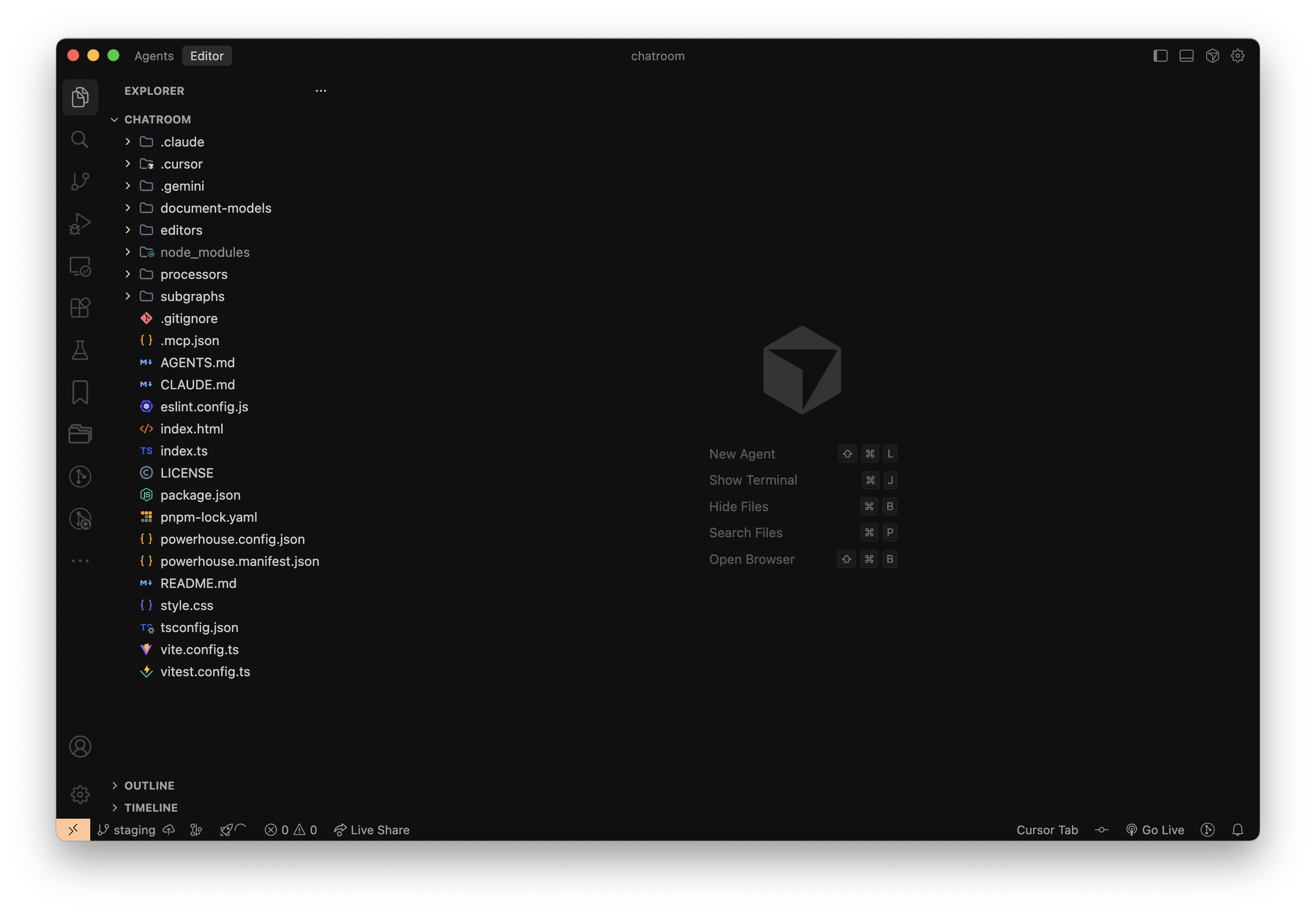
In your project directory
The next steps will take place in the VSCode editor. Make sure to have it open and the terminal window inside VSCode open as well.
To write the operation reducers of the ChatRoom document model, you need to generate the document model code from the document model specification file you have exported into the Powerhouse project directory.
To do this, run the following command in the terminal:
ph generate ChatRoom.phd
You will see that this action created a range of files for you. Before diving in, let's look at this simple schema to familiarize yourself with the structure you've defined in the document model once more. It shows how each type is connected to the next one.

Implement the messages reducers
Navigate to /document-models/chat-room/src/reducers/messages.ts and start writing the operation reducers for the messages module.
Open the messages.ts file and you should see the scaffolding code that needs to be filled for the three message operations. The generated file will look like this:
import type { ChatRoomMessagesOperations } from "@powerhousedao/chatroom-package/document-models/chat-room";

export const chatRoomMessagesOperations: ChatRoomMessagesOperations = {
  addMessageOperation(state, action) {
    // TODO: Implement "addMessageOperation" reducer
    throw new Error('Reducer "addMessageOperation" not yet implemented');
  },
  addEmojiReactionOperation(state, action) {
    // TODO: Implement "addEmojiReactionOperation" reducer
    throw new Error('Reducer "addEmojiReactionOperation" not yet implemented');
  },
  removeEmojiReactionOperation(state, action) {
    // TODO: Implement "removeEmojiReactionOperation" reducer
    throw new Error(
      'Reducer "removeEmojiReactionOperation" not yet implemented',
    );
  },
};
Write the messages operation reducers
Copy and paste the code below into the messages.ts file in the reducers folder, replacing the scaffolding code:
Messages Operation Reducers
import {
  MessageNotFoundError,
  MessageContentCannotBeEmpty,
} from "../../gen/messages/error.js";
import type { ChatRoomMessagesOperations } from "chatroom/document-models/chat-room";

export const chatRoomMessagesOperations: ChatRoomMessagesOperations = {
  addMessageOperation(state, action) {
    if (action.input.content === "") {
      throw new MessageContentCannotBeEmpty();
    }

    const newMessage = {
      id: action.input.messageId,
      sender: {
        id: action.input.sender.id,
        name: action.input.sender.name || null,
        avatarUrl: action.input.sender.avatarUrl || null,
      },
      content: action.input.content,
      sentAt: action.input.sentAt,
      reactions: [],
    };

    state.messages.push(newMessage);
  },
  addEmojiReactionOperation(state, action) {
    const message = state.messages.find((m) => m.id === action.input.messageId);
    if (!message) {
      throw new MessageNotFoundError(
        `Message with ID ${action.input.messageId} not found`,
      );
    }

    if (!message.reactions) {
      message.reactions = [];
    }

    const existingReaction = message.reactions.find(
      (r) => r.type === action.input.type,
    );

    if (existingReaction) {
      if (!existingReaction.reactedBy.includes(action.input.reactedBy)) {
        existingReaction.reactedBy.push(action.input.reactedBy);
      }
    } else {
      message.reactions.push({
        type: action.input.type,
        reactedBy: [action.input.reactedBy],
      });
    }
  },
  removeEmojiReactionOperation(state, action) {
    const message = state.messages.find((m) => m.id === action.input.messageId);
    if (!message) {
      throw new MessageNotFoundError(
        `Message with ID ${action.input.messageId} not found`,
      );
    }

    if (!message.reactions) {
      return;
    }

    const reactionIndex = message.reactions.findIndex(
      (r) => r.type === action.input.type,
    );
    if (reactionIndex === -1) {
      return;
    }

    const reaction = message.reactions[reactionIndex];
    const userIndex = reaction.reactedBy.indexOf(action.input.senderId);

    if (userIndex !== -1) {
      reaction.reactedBy.splice(userIndex, 1);

      if (reaction.reactedBy.length === 0) {
        message.reactions.splice(reactionIndex, 1);
      }
    }
  },
  senderOperation(state, action) {
    // TODO: Implement "senderOperation" reducer
    throw new Error('Reducer "senderOperation" not yet implemented');
  },
};
Write the operation reducer tests
In order to make sure the operation reducers are working as expected, you need to write tests for them.
Navigate to /document-models/chat-room/src/tests and you'll find test files for each module. Replace the scaffolding code with the tests below.
Messages operation tests
Replace the content of messages.test.ts with:
Messages Operation Tests
/**
 * This is a scaffold file meant for customization:
 * - change it by adding new tests or modifying the existing ones
 */

import { describe, it, expect } from "vitest";
import { generateMock } from "@powerhousedao/codegen";
import {
  reducer,
  utils,
  isChatRoomDocument,
  addMessage,
  AddMessageInputSchema,
  addEmojiReaction,
  AddEmojiReactionInputSchema,
  removeEmojiReaction,
  RemoveEmojiReactionInputSchema,
} from "chatroom/document-models/chat-room";

describe("Messages Operations", () => {
  it("should handle addMessage operation", () => {
    const document = utils.createDocument();
    const input = generateMock(AddMessageInputSchema());

    const updatedDocument = reducer(document, addMessage(input));

    expect(isChatRoomDocument(updatedDocument)).toBe(true);
    expect(updatedDocument.operations.global).toHaveLength(1);
    expect(updatedDocument.operations.global[0].action.type).toBe(
      "ADD_MESSAGE",
    );
    expect(updatedDocument.operations.global[0].action.input).toStrictEqual(
      input,
    );
    expect(updatedDocument.operations.global[0].index).toEqual(0);
  });
  it("should handle addEmojiReaction operation", () => {
    const document = utils.createDocument();
    const input = generateMock(AddEmojiReactionInputSchema());

    const updatedDocument = reducer(document, addEmojiReaction(input));

    expect(isChatRoomDocument(updatedDocument)).toBe(true);
    expect(updatedDocument.operations.global).toHaveLength(1);
    expect(updatedDocument.operations.global[0].action.type).toBe(
      "ADD_EMOJI_REACTION",
    );
    expect(updatedDocument.operations.global[0].action.input).toStrictEqual(
      input,
    );
    expect(updatedDocument.operations.global[0].index).toEqual(0);
  });
  it("should handle removeEmojiReaction operation", () => {
    const document = utils.createDocument();
    const input = generateMock(RemoveEmojiReactionInputSchema());

    const updatedDocument = reducer(document, removeEmojiReaction(input));

    expect(isChatRoomDocument(updatedDocument)).toBe(true);
    expect(updatedDocument.operations.global).toHaveLength(1);
    expect(updatedDocument.operations.global[0].action.type).toBe(
      "REMOVE_EMOJI_REACTION",
    );
    expect(updatedDocument.operations.global[0].action.input).toStrictEqual(
      input,
    );
    expect(updatedDocument.operations.global[0].index).toEqual(0);
  });
});
Document model tests
The document-model.test.ts file contains tests to verify the document model structure. Replace its content with:
Document Model Tests
/**
 * This is a scaffold file meant for customization:
 * - change it by adding new tests or modifying the existing ones
 */

import { describe, it, expect } from "vitest";
import {
  utils,
  initialGlobalState,
  initialLocalState,
  chatRoomDocumentType,
  isChatRoomDocument,
  assertIsChatRoomDocument,
  isChatRoomState,
  assertIsChatRoomState,
} from "chatroom/document-models/chat-room";
import { ZodError } from "zod";

describe("ChatRoom Document Model", () => {
  it("should create a new ChatRoom document", () => {
    const document = utils.createDocument();

    expect(document).toBeDefined();
    expect(document.header.documentType).toBe(chatRoomDocumentType);
  });

  it("should create a new ChatRoom document with a valid initial state", () => {
    const document = utils.createDocument();
    expect(document.state.global).toStrictEqual(initialGlobalState);
    expect(document.state.local).toStrictEqual(initialLocalState);
    expect(isChatRoomDocument(document)).toBe(true);
    expect(isChatRoomState(document.state)).toBe(true);
  });
  it("should reject a document that is not a ChatRoom document", () => {
    const wrongDocumentType = utils.createDocument();
    wrongDocumentType.header.documentType = "the-wrong-thing-1234";
    try {
      expect(assertIsChatRoomDocument(wrongDocumentType)).toThrow();
      expect(isChatRoomDocument(wrongDocumentType)).toBe(false);
    } catch (error) {
      expect(error).toBeInstanceOf(ZodError);
    }
  });
  const wrongState = utils.createDocument();
  // @ts-expect-error - we are testing the error case
  wrongState.state.global = {
    ...{ notWhat: "you want" },
  };
  try {
    expect(isChatRoomState(wrongState.state)).toBe(false);
    expect(assertIsChatRoomState(wrongState.state)).toThrow();
    expect(isChatRoomDocument(wrongState)).toBe(false);
    expect(assertIsChatRoomDocument(wrongState)).toThrow();
  } catch (error) {
    expect(error).toBeInstanceOf(ZodError);
  }

  const wrongInitialState = utils.createDocument();
  // @ts-expect-error - we are testing the error case
  wrongInitialState.initialState.global = {
    ...{ notWhat: "you want" },
  };
  try {
    expect(isChatRoomState(wrongInitialState.state)).toBe(false);
    expect(assertIsChatRoomState(wrongInitialState.state)).toThrow();
    expect(isChatRoomDocument(wrongInitialState)).toBe(false);
    expect(assertIsChatRoomDocument(wrongInitialState)).toThrow();
  } catch (error) {
    expect(error).toBeInstanceOf(ZodError);
  }

  const missingIdInHeader = utils.createDocument();
  // @ts-expect-error - we are testing the error case
  delete missingIdInHeader.header.id;
  try {
    expect(isChatRoomDocument(missingIdInHeader)).toBe(false);
    expect(assertIsChatRoomDocument(missingIdInHeader)).toThrow();
  } catch (error) {
    expect(error).toBeInstanceOf(ZodError);
  }

  const missingNameInHeader = utils.createDocument();
  // @ts-expect-error - we are testing the error case
  delete missingNameInHeader.header.name;
  try {
    expect(isChatRoomDocument(missingNameInHeader)).toBe(false);
    expect(assertIsChatRoomDocument(missingNameInHeader)).toThrow();
  } catch (error) {
    expect(error).toBeInstanceOf(ZodError);
  }

  const missingCreatedAtUtcIsoInHeader = utils.createDocument();
  // @ts-expect-error - we are testing the error case
  delete missingCreatedAtUtcIsoInHeader.header.createdAtUtcIso;
  try {
    expect(isChatRoomDocument(missingCreatedAtUtcIsoInHeader)).toBe(false);
    expect(assertIsChatRoomDocument(missingCreatedAtUtcIsoInHeader)).toThrow();
  } catch (error) {
    expect(error).toBeInstanceOf(ZodError);
  }

  const missingLastModifiedAtUtcIsoInHeader = utils.createDocument();
  // @ts-expect-error - we are testing the error case
  delete missingLastModifiedAtUtcIsoInHeader.header.lastModifiedAtUtcIso;
  try {
    expect(isChatRoomDocument(missingLastModifiedAtUtcIsoInHeader)).toBe(false);
    expect(
      assertIsChatRoomDocument(missingLastModifiedAtUtcIsoInHeader),
    ).toThrow();
  } catch (error) {
    expect(error).toBeInstanceOf(ZodError);
  }
});
Run the tests
Now you can run the tests to make sure the operation reducers are working as expected.
pnpm run test
Output should be similar to:
 ✓ document-models/chat-room/src/tests/document-model.test.ts (3 tests) 1ms
 ✓ document-models/chat-room/src/tests/messages.test.ts (3 tests) 8ms
 ✓ document-models/chat-room/src/tests/settings.test.ts (2 tests) 2ms

 Test Files  3 passed (3)
      Tests  8 passed (8)
   Start at  15:19:52
   Duration  3.61s (transform 77ms, setup 0ms, collect 3.50s, tests 14ms, environment 0ms, prepare 474ms)
If you got a similar output, you have successfully implemented the operation reducers and tests for the ChatRoom document model.
Compare with reference implementation
Verify your implementation matches the tutorial:
# View reference reducer implementation
git show tutorial/main:document-models/chat-room/src/reducers/messages.ts
git show tutorial/main:document-models/chat-room/src/reducers/settings.ts

# View reference test implementation
git show tutorial/main:document-models/chat-room/src/tests/messages.test.ts
git show tutorial/main:document-models/chat-room/src/tests/settings.test.ts

# Compare your entire implementation
git diff tutorial/main -- document-models/chat-room/src/
Up next: ChatRoom editor
Continue to the next section to learn how to implement the document model editor so you can see a simple user interface for the ChatRoom document model in action.